Posts

Showing posts with the label Axure

How do I use InVision

Image
Team lead asked me to write what InVision products do I use, how I use them, what are pros and cons. I wrote it today, and really think it will be helpful to share my thoughts with wider audience. So, below is the adaptation of what I provided to the engineering management in one fintech company.  I use InVision to share my hi-fi designs and specs, which I create in Sketch desktop application. This is my primary and every day usage of InVision, and about 90% of all usecases of all InVision products combined.  I sync designs via the plugin in Sketch made by Invision, called Craft .  When they are in InVision, we call those designs prototypes .  It works, but I often experience slowness. Sometimes sync process is failing, and I have to try it again. In Sketch I select one or more artboards, then initiate sync, which sends the artboard to InVision cloud. I have to be logged in Craft plugin with my InVision credentials. Almost every day, especially when I design intens...

Interaction Design and Interactive Prototypes (Axure RP)

Image
This page is demonstrating what kind of interactive prototypes can be designed/developed in Axure RP . To achieve the complex interactions, involving some basic math functions, and DOM updates, I injected javascript through the back door the Axure leaves for designers. The trick consists in ability of jquery-based javascript access any DOM element on the html page, and manipulate it. However the detailed explanation how and why I developed these prototypes is outside of the scope of this article.  At least for now. Below are my examples of interactive design, along with the instructions how to use some of their interactive features. These Interactive Prototypes are not part of my portfolio. Notice these are just some examples. I did much more while working in Calypso Technology. Interactive Prototypes created with Axure RP prototyping software Forex/Equity Options Flow Pricer http://i2ulu8.axshare.com 1.    In the datagrid, in the "Enter new trade" on...

Axure RP: Image over button - Where do I put the interaction?

Image
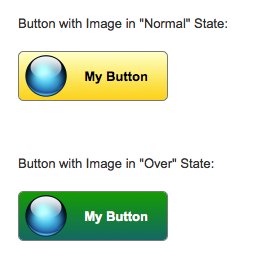
Tool: Axure RP 7 Beta. It's a software to create high-fidelity interactive prototypes. The problem: to create a button with custom image over it. On mouse hover over the button or over the image we want to display button's different style. In Axure 7 you can select image and button and convert them to Dynamic Panel, then you can apply any mouse/keyboard events interactions to it, for example OnMouseEnter and OnMouseOut. However, in this case, you will loose interaction styles on the button when your mouse is over the image instead of the button: button will not be highlighted. Solution: First, create the Button Shape, and place the Image over it. Style it in the way it appeals to you. Now, select the both, the button and the image, and convert them into dynamic panel: Give the new dynamic panel a name. It's a good practice: Double-click on the dynamic panel. It will bring Panel States dialog:   Rename the default "State 1" to "Normal...