Posts

Showing posts with the label design

Bits and pieces of 5 Senses - Visual Design

Image
The idea here is to promote a healthy life style through educating and producing healthy plant based food. "Making the world healthier." The logo. "5 senses" name is depicted as a young and healthy growing plant with the five buds. Inspired by other "natural and healthy" brands, we also are using earth tones and colors.  Style Guide. Minimal viable styleguide to cover basic needs, as the website and online presence is yet to be established. As you can see it not only follows the earthy colors of the logo but also has simple, easy to read, and widely recognized fonts. Business Cards. These have been designed exclusively for the Raw Vegan speech event. Flyer for the same event. More to be designed! All work is done in Illustrator and Sketch.

Defining a Persona

After some small research I realized it really depends on your own goals – what exactly you want to know about the user. Below are some of my thoughts how to define a persona, but they are rather “recommendations” than a solid template: Defining a Persona A persona represents a group of users who exhibit similar behavioral patterns in their use of technology or products, customer service preferences, lifestyle choices, and the like. A persona details should list relevant to your business [or to your software] items.  One of the ways defining them is to conduct users interviews on the customer side (among potential end users), and starting from 30 interviews we can create a definition of our persona. Other thought how it can be done is through anonymous online surveys. There are some details we may find about a persona, split on two main categories: 1. Personal Profile 1.     Age range (or broader: demographics) 2.  ...

10 Principles of Good Design (by Dieter Rams)

Image

Axure RP: Image over button - Where do I put the interaction?

Image
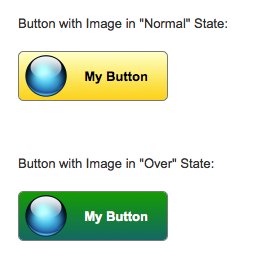
Tool: Axure RP 7 Beta. It's a software to create high-fidelity interactive prototypes. The problem: to create a button with custom image over it. On mouse hover over the button or over the image we want to display button's different style. In Axure 7 you can select image and button and convert them to Dynamic Panel, then you can apply any mouse/keyboard events interactions to it, for example OnMouseEnter and OnMouseOut. However, in this case, you will loose interaction styles on the button when your mouse is over the image instead of the button: button will not be highlighted. Solution: First, create the Button Shape, and place the Image over it. Style it in the way it appeals to you. Now, select the both, the button and the image, and convert them into dynamic panel: Give the new dynamic panel a name. It's a good practice: Double-click on the dynamic panel. It will bring Panel States dialog:   Rename the default "State 1" to "Normal...

SVG - XML based vector graphics to replace GIFs and PNGs

Image
While doing UI design I faced problems with animated spinners, which I created in GIF format. One problem is I have to place spinning images on top of differently colored tiles, on various colors, which I cannot control. And second is the tiles are scalable, and the animated GIFs should scale as well. But they don't. These issues though can be addressed by SVG format, which is supported by all major browsers except Internet Explorer (of course). IE doesn't understand animation in SVG. (Note: if the SVG graphics doesn't work on this page as described, or for any other reason, you can visit a standalone demo page . On that demo page instead of <embed> tag I use <img>, which in the case of simple SVG animation works exactly the same. However to render it properly in Blogger posts I have to use either <embed> or <object> tags.) So, here is the problem. Animation: Notice rough edges, and scaling quality loss on the last tile: I...

Design practice: How fast the transition animation for expandable panels should be

Image
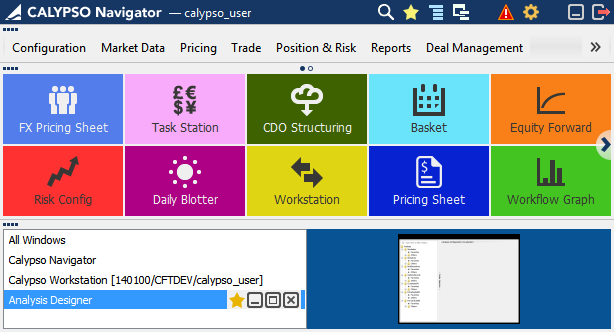
At some point I had an argument with a developer on how fast the transitional animation should be. In our application, Calypso Navigator, we are using a transition animation to give users a feedback of the expanding/collapsing process, and to explain this task visually by drawing more attention to the change. This software has three main areas, which are collapsible panels: Main Menu, Favorite Tiles, and Windows Manager, as shown below. [Expanded All screenshot] [Collapsed All but Main Menu screenshot] [Collapsed All but Favorite Tiles screenshot] On my opinion the animation was too slow, at some cases it took about a second, however in my thinking it had to be instantaneous. The argument of the developer was: if it will be that fast, and the user can’t visually track what is changing and how, then the animation doesn’t make sense at all. I opened Google page attempting to find what professional world’s opinion on this matter is, and found this guideline: h...

Is it a problem of objective, or shoud UX designer know how to code?

Communication, understanding, and right message are very important from the beginning. What I learned: have a strong and clear objective. Deliver it to right people. Preface: I applied for UX Designer position in a large company. Then was given a call from HR, and during the conversation I mentioned that, yes, I can write the code on JavaScript. Follow up was the scheduling of a phone interview. Phone ring… I was asked to open a link with some code editor window in browser. And the first question on the interview, which apparently appeared to be a strictly technical and coding interview, was: - Are you familiar with JavaScript? Ok, write the code to implement event handling in JavaScript as if no implementation of event handling existed in JavaScript . - Uh, what? What exactly in your mind? - I want these two functions: function addEvent(element, eventType, callback) function fireEvent(eventType) - Ok, we can create our own object and make these two functions be a public ...

My Approach To Design

Image
Here is my objective of what I do designing things, what makes me creative, productive, and helps to deliver an awesome result: I am seeing myself as a pixel perfectionist with developer/technical background, and with the ability to understand the intersections of disciplines from multiple perspectives bringing the big picture to the table I approach design with a simple, fun, and intuitive mindset. I enjoy conceptualizing and designing clean interfaces. I love simple, usable interfaces and appreciate the hard work that goes behind creating them. I love to see my work come to life in front of a large audience. I subscribe to the Less Is More (minimalistic) design philosophy. I solve complex problems and drive company’s products experience forward. I design simple experiences that delight users. I am taking business requirements and translating them into customer experience requirements. I visualize them. My goal is true innovation to help end users with sincere empathy....