Posts

SVG - XML based vector graphics to replace GIFs and PNGs

Image
While doing UI design I faced problems with animated spinners, which I created in GIF format. One problem is I have to place spinning images on top of differently colored tiles, on various colors, which I cannot control. And second is the tiles are scalable, and the animated GIFs should scale as well. But they don't. These issues though can be addressed by SVG format, which is supported by all major browsers except Internet Explorer (of course). IE doesn't understand animation in SVG. (Note: if the SVG graphics doesn't work on this page as described, or for any other reason, you can visit a standalone demo page . On that demo page instead of <embed> tag I use <img>, which in the case of simple SVG animation works exactly the same. However to render it properly in Blogger posts I have to use either <embed> or <object> tags.) So, here is the problem. Animation: Notice rough edges, and scaling quality loss on the last tile: I...
Design practice: How fast the transition animation for expandable panels should be

Image
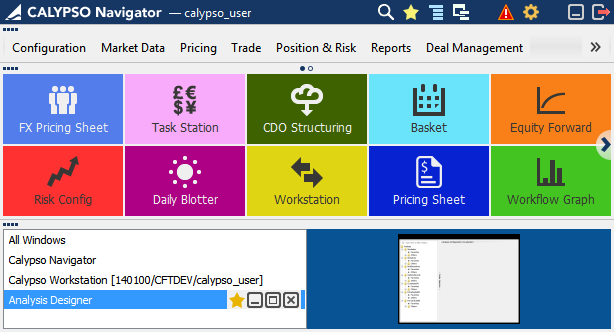
At some point I had an argument with a developer on how fast the transitional animation should be. In our application, Calypso Navigator, we are using a transition animation to give users a feedback of the expanding/collapsing process, and to explain this task visually by drawing more attention to the change. This software has three main areas, which are collapsible panels: Main Menu, Favorite Tiles, and Windows Manager, as shown below. [Expanded All screenshot] [Collapsed All but Main Menu screenshot] [Collapsed All but Favorite Tiles screenshot] On my opinion the animation was too slow, at some cases it took about a second, however in my thinking it had to be instantaneous. The argument of the developer was: if it will be that fast, and the user can’t visually track what is changing and how, then the animation doesn’t make sense at all. I opened Google page attempting to find what professional world’s opinion on this matter is, and found this guideline: h...

IE10 does not have conditional comments anymore

Probably old news for many of you. Internet Explorer 10 will totally ignore your code similar to this one: <!--[if IE]> <![endif]--> After some search I found the topic on stackoverflow.com: http://stackoverflow.com/questions/9900311/how-do-i-target-only-ie10-for-certain-situations-like-ie-specific-css-or-ie-spec/14087321#14087321 You can also read my reply there. Why do we have to address it? The problem is IE10 has its own rendering engine which differs from other browsers, and some specific css styles still require special handling in case of IE10. The solution for css styles will be using  document.documentElement  - the root element associated with any document,  documentMode property of IE , which says how IE interprets and renders the document, and  @cc_on Statement , which activates conditional compilation support in JavaScript in IE. You include the next one-line script inside of head tag of your html page before your css link. ...

Windows 8 Pro in Screenshots

Image
Two days ago I decided to take an advantage of BizSpark and installed Windows 8 Pro on my Lenovo laptop. My impression: User Experience which is blowing your mind! I haven't seen so much innovations in one product since the first iPhone from 2007. It's totally new approach what you can do and how you can use Windows. Suddenly it's fun again. Screenshot #1. New concept of a start screen with Modern (Metro) UI applications from Application Store. Live tiles, Charms, new typography and semantic scaling... Possibility of customization are almost infinite. Yes, like those which are on Android or iOS. Of course, there are not that many applications in the store yet. Official launch of Windows 8 is still in the future: October 26th. Screenshot #2. Email application supports all my email accounts on Google, Yahoo, Hotmail and even German GMX. If you want to configure any application, just press Windows key + C on the keyboard, and you see these common UI elements called Ch...

Today's limitations of HTML5 video support

It's hard to believe but there are still some. At least two conditions/limitation when your browser will not play HTML5 video, EVEN if you think you have a decent one: 1. Safari for Windows only supports HTML 5 video if Quicktime is also installed . 2. No support in Internet Explorer prior version 9 . (Probably it's not an issue, unless you are inside of corporate network and extremely conservative IT department.) My test page for you (created by Easy HTML5 Video Converter) to test HTML5 support in your browser. If your browser supports HTML5 video it will play:  http://files.kardash.net/jslab/html5video/ -------------- Below are links about HTML5 video to consider: http://www.808.dk/?code-html-5-video - HTML 5 video with table of browsers compatibility. http://easyhtml5video.com/ - converter of your video format to any of HTML5 supported formats: OGG (Theora video codec), MP4 (H.264 video codec), WebM (VP8 video codec), and Flash MP4 (for fallback to ...

Video in HTML5: no support in Safari for Windows

All modern websites show videos. But before HTML5 it was plugin based functionality, such as Flash, Quick Time, or ActiveX. Today there is a better technology: HTML5, supposingly supported by all popular browsers. HTML5 is not new in the tech world, and provides a standard: <video> tag. I have tested all my five browsers on Windows 7 desktop, and four of them - Chrome, Firefox, IE 9 and Opera - show video without problems, though UI controls, such as play/pause button, volume and full sreeen, are slightly different. What I am having problem with is Safari. Yes, Apple Safari 5.1.7. Safari is always described as a browser with native HTML5 video/audio support, but this is in fact not true. Try to open this page , which consists of a video tag: Your browser does not support the video tag. And Safari will give you "Your browser does not support the video tag." Another official link will render black rectangle in Safari. Probably the most valuable corpora...

Five (5) cool new HTML5 text-level semantics elements

HTML5 adds to our web pages the new structural semantic elements like <header>, <aside>, <nav>, <section> and many other, which are pretty awesome. But what even more exciting are the new text-level semantics elements which change text visually without extra (and sometimes complex) coding. Below are the overview of five of them. Unfortunately only Chrome browser supports them in full today. 4 out of 5 work in Opera. Firefox and Safari support fewer, Internet Explorer 9 is on last place, and hopefully this will be changed in upcoming IE 10. Refer to the table of supporting browsers at the end of the post. 1. The "mark" Element The <mark> tag is used to highlight or reference a run of text due to it's relevance in some other context. You can incorporate this tag into the search results page on your website or blog to enable your visitors to more quickly find the content they search for. 2. The "progress" Element If y...