Posts

Interaction Design and Interactive Prototypes (Axure RP)

Image
This page is demonstrating what kind of interactive prototypes can be designed/developed in Axure RP . To achieve the complex interactions, involving some basic math functions, and DOM updates, I injected javascript through the back door the Axure leaves for designers. The trick consists in ability of jquery-based javascript access any DOM element on the html page, and manipulate it. However the detailed explanation how and why I developed these prototypes is outside of the scope of this article.  At least for now. Below are my examples of interactive design, along with the instructions how to use some of their interactive features. These Interactive Prototypes are not part of my portfolio. Notice these are just some examples. I did much more while working in Calypso Technology. Interactive Prototypes created with Axure RP prototyping software Forex/Equity Options Flow Pricer http://i2ulu8.axshare.com 1.    In the datagrid, in the "Enter new trade" on...

Defining a Persona

After some small research I realized it really depends on your own goals – what exactly you want to know about the user. Below are some of my thoughts how to define a persona, but they are rather “recommendations” than a solid template: Defining a Persona A persona represents a group of users who exhibit similar behavioral patterns in their use of technology or products, customer service preferences, lifestyle choices, and the like. A persona details should list relevant to your business [or to your software] items.  One of the ways defining them is to conduct users interviews on the customer side (among potential end users), and starting from 30 interviews we can create a definition of our persona. Other thought how it can be done is through anonymous online surveys. There are some details we may find about a persona, split on two main categories: 1. Personal Profile 1.     Age range (or broader: demographics) 2.  ...

10 Principles of Good Design (by Dieter Rams)

Image

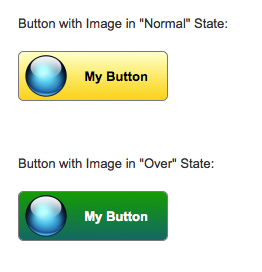
Axure RP: Image over button - Where do I put the interaction?

Image
Tool: Axure RP 7 Beta. It's a software to create high-fidelity interactive prototypes. The problem: to create a button with custom image over it. On mouse hover over the button or over the image we want to display button's different style. In Axure 7 you can select image and button and convert them to Dynamic Panel, then you can apply any mouse/keyboard events interactions to it, for example OnMouseEnter and OnMouseOut. However, in this case, you will loose interaction styles on the button when your mouse is over the image instead of the button: button will not be highlighted. Solution: First, create the Button Shape, and place the Image over it. Style it in the way it appeals to you. Now, select the both, the button and the image, and convert them into dynamic panel: Give the new dynamic panel a name. It's a good practice: Double-click on the dynamic panel. It will bring Panel States dialog:   Rename the default "State 1" to "Normal...

SVG - XML based vector graphics to replace GIFs and PNGs

Image
While doing UI design I faced problems with animated spinners, which I created in GIF format. One problem is I have to place spinning images on top of differently colored tiles, on various colors, which I cannot control. And second is the tiles are scalable, and the animated GIFs should scale as well. But they don't. These issues though can be addressed by SVG format, which is supported by all major browsers except Internet Explorer (of course). IE doesn't understand animation in SVG. (Note: if the SVG graphics doesn't work on this page as described, or for any other reason, you can visit a standalone demo page . On that demo page instead of <embed> tag I use <img>, which in the case of simple SVG animation works exactly the same. However to render it properly in Blogger posts I have to use either <embed> or <object> tags.) So, here is the problem. Animation: Notice rough edges, and scaling quality loss on the last tile: I...

Design practice: How fast the transition animation for expandable panels should be

Image
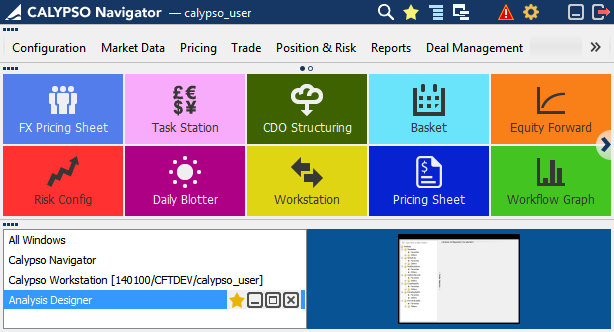
At some point I had an argument with a developer on how fast the transitional animation should be. In our application, Calypso Navigator, we are using a transition animation to give users a feedback of the expanding/collapsing process, and to explain this task visually by drawing more attention to the change. This software has three main areas, which are collapsible panels: Main Menu, Favorite Tiles, and Windows Manager, as shown below. [Expanded All screenshot] [Collapsed All but Main Menu screenshot] [Collapsed All but Favorite Tiles screenshot] On my opinion the animation was too slow, at some cases it took about a second, however in my thinking it had to be instantaneous. The argument of the developer was: if it will be that fast, and the user can’t visually track what is changing and how, then the animation doesn’t make sense at all. I opened Google page attempting to find what professional world’s opinion on this matter is, and found this guideline: h...

IE10 does not have conditional comments anymore

Probably old news for many of you. Internet Explorer 10 will totally ignore your code similar to this one: <!--[if IE]> <![endif]--> After some search I found the topic on stackoverflow.com: http://stackoverflow.com/questions/9900311/how-do-i-target-only-ie10-for-certain-situations-like-ie-specific-css-or-ie-spec/14087321#14087321 You can also read my reply there. Why do we have to address it? The problem is IE10 has its own rendering engine which differs from other browsers, and some specific css styles still require special handling in case of IE10. The solution for css styles will be using  document.documentElement  - the root element associated with any document,  documentMode property of IE , which says how IE interprets and renders the document, and  @cc_on Statement , which activates conditional compilation support in JavaScript in IE. You include the next one-line script inside of head tag of your html page before your css link. ...